How Does the Descript Discount Guide Help Save 50% on AI Video Editing Costs?

Hello there! I'm Jovin George, the proud founder of SoftReviewed. With over a decade of experience in digital marketing, I embarked on this exciting journey in 2023 with a clear vision – to assist software buyers in making informed and confident decisions.
At SoftReviewed, my team and I are a bunch of passionate software enthusiasts dedicated to providing honest and unbiased reviews and guides. We aim to simplify the software buying process, ensuring that individuals find the best solutions tailored to their needs and budget.
My role extends beyond founding SoftReviewed; I lead our dynamic team in reviewing, comparing, and recommending software products. From web design and development to SEO, SEM, SMM, and content marketing, I oversee it all. I'm genuinely enthusiastic about technology and software, and I love sharing my knowledge and insights with our incredible community.
If you have any questions or feedback,don't hesitate to reach out. SoftReviewed is here to be your trusted source for software reviews and guides, making your software-buying experience easy and enjoyable. Thank you for choosing us on your journey through the digital landscape.
Warm regards, Jovin George
The digital video editing space is shifting toward simplicity and efficiency. Thanks to Descript, the old days of timeline scrubbing and complex software are being replaced by an innovative text-based approach. By editing a transcript rather than a video timeline, Descript reduces technical hassle and saves creators countless hours.
What Makes Descript Stand Out?
Descript transforms video editing by converting spoken words to text. This method allows users to correct mistakes, rearrange segments, and polish their content as if they were editing a document. The tool is packed with AI-powered features that help remove filler words, enhance audio quality, and even adjust eye contact in recorded footage.
How Descript Simplifies Editing
Editing becomes as simple as editing a text document. Users can:
- Delete unwanted words to automatically cut corresponding video segments
- Organize content by moving sections of text
- Generate accurate transcripts that map to specific video moments
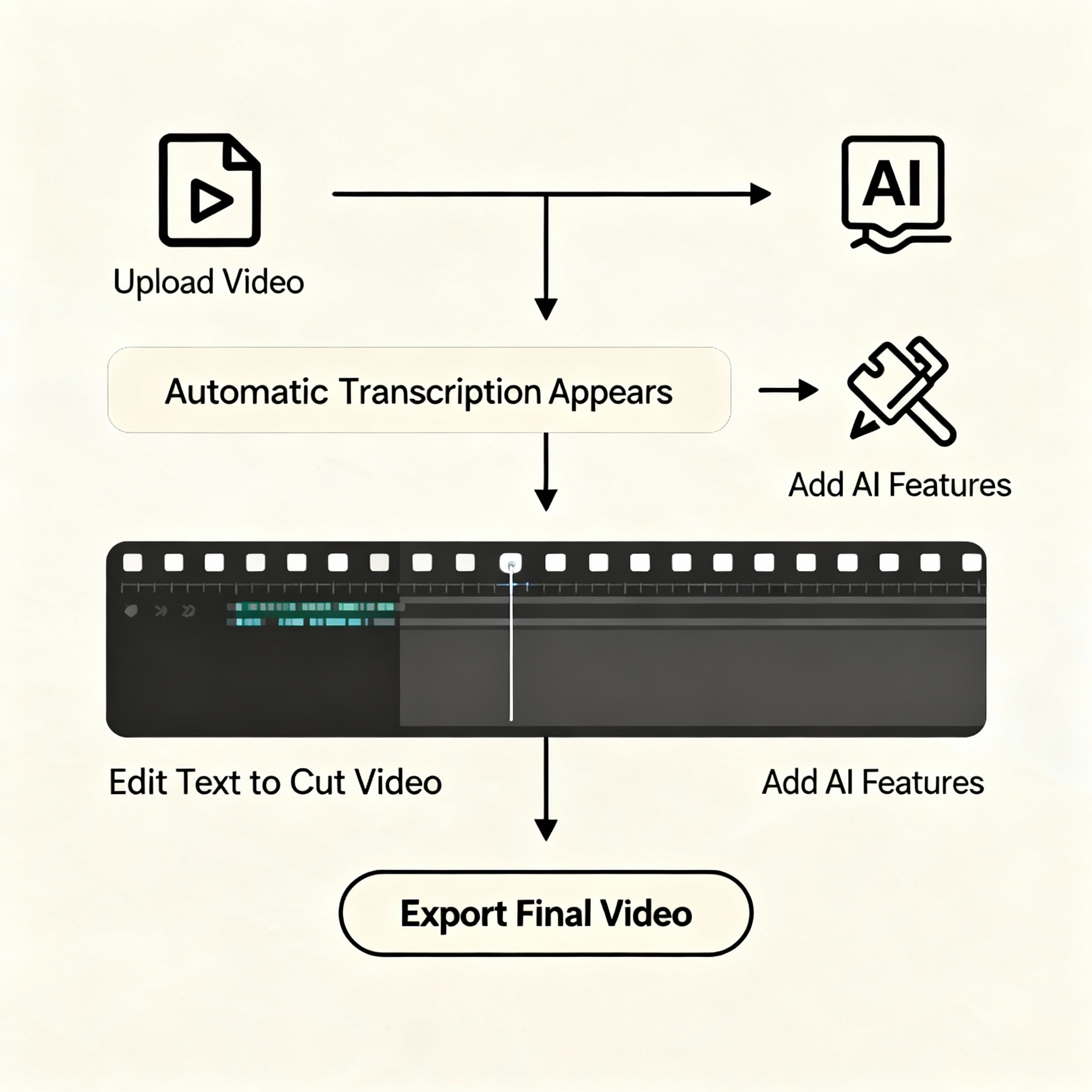
The process is not only intuitive but also reduces the time spent on post-production. This streamlined workflow makes high-quality editing accessible to a broader range of creators, from podcasters to YouTube videographers.
Key AI Features That Save Time
Descript offers several AI tools that make editing more efficient. Some of these features include:
- Studio Sound: Transforms average audio into professional-grade recordings
- Filler Word Removal: Eliminates common hesitations like 'um' and 'uh'
- Eye Contact Correction: Adjusts your gaze to keep you connected with the audience
- Green Screen and Background Removal: Offers background replacement without additional equipment
- Automatic Captions and Subtitles: Generates customizable captions on the fly
- Voice Cloning (Overdub): Allows minor corrections by generating new audio in your voice
These features work together to make editing not only faster but also more creative, giving users time to focus on storytelling rather than technical challenges.
Understanding Pricing and Discount Opportunities
While Descript offers several pricing tiers, the chance to save significantly comes through smart subscription strategies. Here are some tips for saving on your plan:
- Annual Billing: Switching from monthly to annual billing can save around 35% on various plans.
- New User Promotions: Special promotions may offer up to 50% off for the first couple of months, providing immediate savings.
- Startup and Educational Discounts: Verified startups and students can often access exclusive discounts that reduce overall costs.
- Free Plan Strategy: For those with light editing needs, making the most of the free plan's limited free hours can be a good temporary solution.
The pricing structure ranges from a free tier with basic features to premium options designed for businesses. This flexibility ensures that creators of all sizes can find a plan that fits their needs while benefiting from targeted discounts.
Comparing Descript With Alternatives
When weighing Descript against other video editing software, a few key differences emerge. Below is a simplified comparison:
| Feature/Tool | Descript | Riverside | CapCut |
| Editing Method | Text-based editing | Traditional recording | Timeline-based editing |
| AI-Powered Enhancements | Extensive (Overdub, etc.) | Limited | Some AI features |
| Ease of Use | Very accessible | User-friendly | Simple interface |
| Best For | Dialogue-heavy content | Remote interviews | Social media clips |
Descript strikes a balance by offering simplicity along with innovative AI tools. Unlike advanced software such as Premiere or Final Cut, it removes barriers for casual creators while still providing powerful editing capabilities.
Is Descript the Right Fit for You?
Consider Descript if you:
- Produce content regularly that involves speaking, such as podcasts or video essays
- Want to reduce editing time while keeping production quality high
- Need a platform that eases collaboration and repurposing of content
On the flip side, creators who rely on intricate visual effects or require mobile editing might find that dedicated professional software better meets their needs.
Final Thoughts
Descript not only simplifies video editing through text manipulation but also offers substantial savings through smart pricing plans and discount opportunities. By lowering the technical barriers, it empowers a diverse range of creators to produce quality content with fewer hassles and in less time.